
Rules files4 min readBy Startpacks
Writing and using rules files: AGENTS.md, CLAUDE.md and Cursor rules
What each rules file does, how they fit together in a Startpacks pack, and a short checklist for writing rules an agent will actually follow. Examples come from the free Supabase Vite SaaS pack.
Every Startpacks pack ships three kinds of rules files, because different tools read different files. This guide explains what each one is, how a pack combines them so you maintain one set of rules, and how to write lines an agent will actually follow. The examples are from the free Supabase Vite SaaS pack.
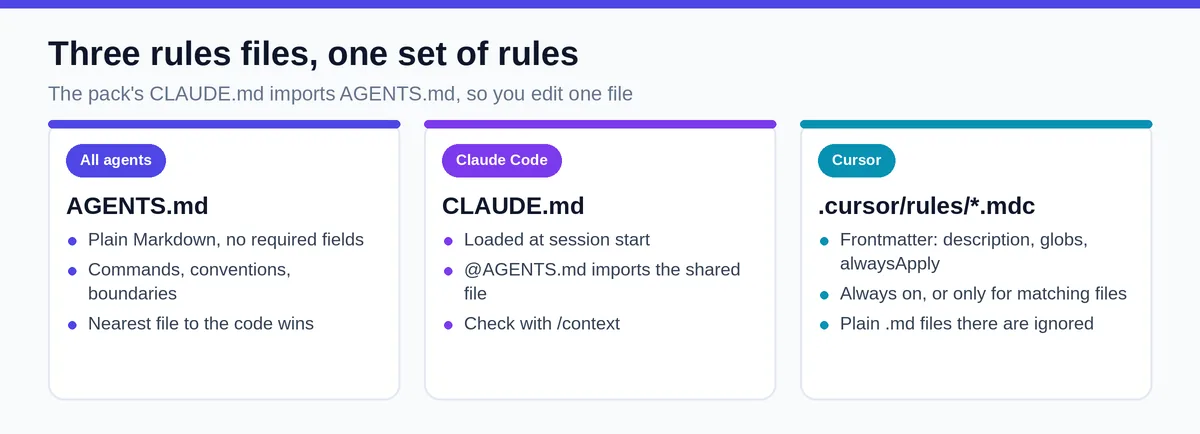
The three files in one table
| File | Read by | Think of it as |
|---|---|---|
AGENTS.md | Many coding agents (the format's own site lists Codex, Cursor, Gemini CLI, Aider, Zed, Windsurf and others) | A README for agents: commands, conventions, boundaries |
CLAUDE.md | Claude Code | The same idea, with Claude-specific notes; can import other files |
.cursor/rules/*.mdc | Cursor | Small rules with metadata that decides when each one applies |
AGENTS.md: the shared baseline
AGENTS.md is described on agents.md as a simple, open format for guiding coding agents: plain Markdown, no required fields, use whatever headings you like. In a monorepo you can add nested files, and the closest one to the file being edited takes precedence; an explicit instruction in your chat overrides everything. The site also states that the format is now stewarded by the Agentic AI Foundation under the Linux Foundation.
In our pack it is about 25 lines and has the same shape every time: stack, commands, rules, skills. This is the commands section, abridged:
## Commands
- Typecheck: `npm run typecheck` · Unit: `npx vitest run` · E2E: `npx playwright test`
- DB: `supabase start` · `supabase migration new <name>` · `supabase db reset` · `supabase test db`
- Before saying "done": typecheck + `vitest run` + `supabase test db` all pass; paste summary lines.
Listing commands matters because agents will run the checks you name and try to fix failures before finishing, as the AGENTS.md site notes.
CLAUDE.md: import, do not duplicate
Claude Code loads CLAUDE.md at the start of a session. Its documentation says that if a repository has both a CLAUDE.md and an AGENTS.md in the working directory, Claude reads the CLAUDE.md files only, unless you change the setting. That is why every pack's CLAUDE.md begins with a single import line:
@AGENTS.md

Claude Code notes:
- Skills live in `.claude/skills/` (copy this pack's `skills/*`). Use the matching skill before writing SQL, Edge Functions, or auth code.
The @path syntax pulls the file in at launch, so Claude gets the shared rules plus its own notes, and you edit one file. Check it worked with /context, which lists the memory files that were loaded. Claude Code's /init command can also generate a starting CLAUDE.md from your codebase if you have none.
Cursor rules: scoped rules with metadata
Cursor project rules live in .cursor/rules as .mdc files. A plain .md file there is ignored because it has no frontmatter. The frontmatter has three fields that decide when a rule applies: alwaysApply, globs and description. The pack uses the two most useful patterns. This one is always on:
---
description: Core guardrails for the Supabase + Vite SaaS stack
alwaysApply: true
---
- RLS on every exposed table, in the same migration, with a pgTAP test. Never edit applied migrations.
- No secret/service_role keys or Stripe secrets in `src/` or git.
And this one attaches itself only when matching files are in context:
---
description: SQL migrations and RLS policies
globs: ["supabase/migrations/**/*.sql", "supabase/tests/**/*.sql"]
alwaysApply: false
---
- New file via `supabase migration new <name>`; never edit an applied one.
- One policy per operation (select/insert/update/delete); always `to authenticated|anon`.
Splitting rules by file type keeps the always-on text short. That matters because everything an agent has to read competes for the same context window.
Seven rules for writing rules
- Be verifiable. Claude's docs contrast "Use 2-space indentation" with "Format code properly" and "Run
npm testbefore committing" with "Test your changes". If you cannot check a line, rewrite it. - Put commands first. Build, test and lint commands are the highest-value lines you can write.
- Keep each file short. Claude's guidance is under 200 lines per
CLAUDE.md; Cursor suggests rules under 500 lines. Split by topic or file type instead of growing one file. - Write down mistakes, not wishes. Add a rule when the agent makes the same mistake a second time. Both vendors recommend this habit.
- Remove conflicts. If two lines contradict each other, the agent may pick either. Review nested files and rule folders now and then.
- Do not copy what a tool already enforces. Cursor advises against pasting whole style guides; use a linter and point the agent at it.
- Know the limit. Claude Code treats
CLAUDE.mdas context, not enforced configuration. For something that must happen every time, such as running a check before each commit, use a hook or CI. Our pack's rule "run typecheck, tests and DB tests before saying done" is guidance; your pipeline is what enforces it.
How a pack applies this
Look at the Supabase pack's rule 1: "RLS first. Every table in an exposed schema: enable RLS, revoke grants from anon and authenticated, grant back only what is needed, one policy per operation, with to <role>, in the same migration, with a pgTAP test." It is specific, checkable, and short enough to read in ten seconds. The long-form procedure lives in a skill (rls-first-migration) so it only loads when an agent writes a migration.
Try it
Download a free pack (Supabase Vite SaaS, Progressive Web App with Vite and TypeScript or Unreal C++ TDD), read its AGENTS.md, delete one rule you disagree with, add one you need, and run a small task. If the agent ignores the new line, make it more specific before you make it louder.
- #agents.md
- #claude.md
- #cursor rules
- #how-to