
Skills5 min readBy Startpacks
Using skills effectively: SKILL.md playbooks that load on demand
How a skill differs from a rule, how to write a description that triggers at the right moment, and where to put skill folders. Worked examples from the Pull Request Reviewer and Supabase packs.
Rules files tell an agent what is always true about your project. Skills tell it how to do one particular job, and they only cost context when that job comes up. Most Startpacks packs include a skills/ folder: the free Pull Request Reviewer has three, Supabase Vite SaaS has five, and Unreal C++ TDD has seven. This guide shows how to read them, install them and write your own.
Rule or skill? A simple test
Claude Code's documentation draws the line clearly: keep facts in CLAUDE.md (build commands, conventions, "always do X"), and move an entry to a skill when it is a multi-step procedure or matters for only one part of the codebase. A skill's body loads only when it is used, so long reference material costs almost nothing until you need it.
| Rules file | Skill | |
|---|---|---|
| Loaded | Every session (or when matching files appear) | When the task matches its description, or when you call it by name |
| Good for | Commands, boundaries, naming, "never do this" | Checklists, procedures, templates for one job |
| Example in a pack | "No secrets in src/" | rls-first-migration: the exact steps to add a table safely |
Anatomy of a skill
A skill is a folder with one required file, SKILL.md: YAML frontmatter between --- lines, then Markdown instructions. Here is a complete, real skill from the Pull Request Reviewer pack:
---
name: diff-risk-triage
description: Use first on any PR: rank files by risk and decide where to spend review effort.
---
# Diff risk triage
High risk first: auth/permissions, payments, migrations/schema, crypto, deserialisation,
file/network access, concurrency, infrastructure/CI, dependency changes.
For each high-risk file ask: who can call this? what input is untrusted?
what happens on failure? is it tested? is it reversible?
Output a table: file | risk | why | checked?
Skim generated/vendored files; do not comment on them.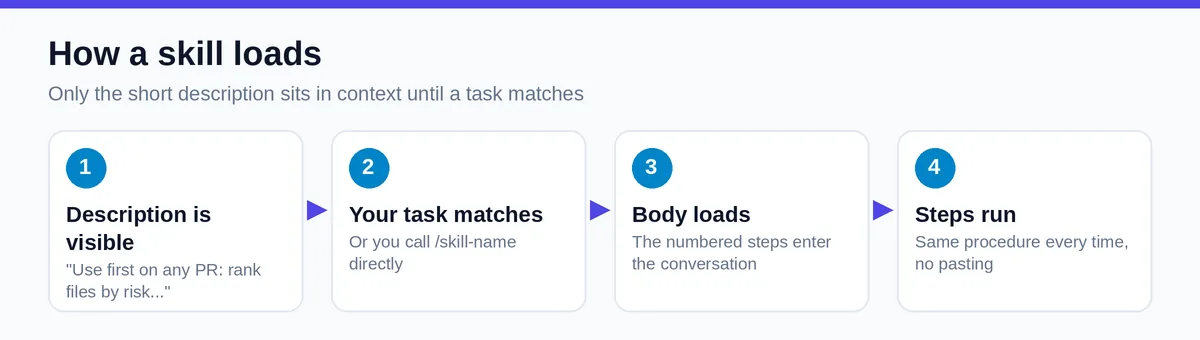
The description does the routing
The frontmatter description is how the agent decides whether to load the skill. Claude Code's docs say the description should say what the skill does and when to use it, and that only the key use case should come first because long descriptions are truncated in the skill listing (the combined text is capped at 1,536 characters). In our packs every description starts with "Use when" or "Use first":
diff-risk-triage: "Use first on any PR: rank files by risk..."review-comment-writing: "Use when drafting review comments: concise, actionable and kind."env-secrets-hygiene: "Use when adding or using environment variables, API keys, Stripe keys or Supabase keys, or before committing."
Write descriptions with the words a person would actually say. "Helps with database stuff" will not match "add a projects table". "Use whenever adding or changing a Supabase table, policy, view or function" will.
Where skill folders go
In Claude Code, project skills live in .claude/skills/<name>/SKILL.md and personal ones in ~/.claude/skills/<name>/SKILL.md. Commit the project folder and your team gets the same skills. Packs keep skills in a top-level skills/ folder so they work with any tool; for Claude Code, copy them over:
mkdir -p .claude && cp -r path/to/pack/skills .claude/skillsClaude Code's skills follow the Agent Skills open standard, so the same SKILL.md format is not tied to one product. Claude Code watches skill folders, so edits take effect in the current session.
Using them
You can let the agent pick a skill by describing the task, or call one directly with /skill-name. To check they are installed, ask "What skills are available?". To test one, run a prompt that should trigger it. For rls-first-migration, try "add a notes table that only its owner can read". The skill then walks through the same sequence every time:
- Create the migration with
supabase migration new add_notesand edit only the new file. - In that file: create the table, enable row level security, revoke grants from
anonandauthenticated, grant back the minimum. - One policy per operation, each with
to <role>, using(select auth.uid()). - Index the columns the policies filter on.
- Write the pgTAP test: anon denied, owner allowed, other users see nothing.
- Run
supabase db reset && supabase test dband fix until green.
Because the checklist lives in the skill, the agent follows it every time without you pasting it into chat.
Writing your own: a 10-minute recipe
- Notice a procedure you paste into chat more than twice.
- Create
.claude/skills/<short-name>/SKILL.mdwithnameanddescription. - Write the steps as commands and checks, not essays. Keep
SKILL.mdunder 500 lines; put long reference material in separate files and link to it. - State what the output looks like (a table, a format) and what to never do.
- Test it with a fresh session and a prompt that should trigger it. If it does not load, rewrite the description with the user's words. If it triggers too often, make the description more specific.
- For anything with side effects, such as deploying or sending messages, add
disable-model-invocation: trueso it only runs when you call it.
Two pitfalls
Too many skills. Each skill's name and description sit in context every turn, so a pile of unused skills has a cost. Claude Code can show what skills cost and which are never used; prune the ones you do not need.
Treating a skill as enforcement. A skill is instructions, not a guarantee. Claude's docs recommend a hook when something must run every time. Use skills for judgment and procedure, and CI for enforcement.
Try it
Install the three skills from Pull Request Reviewer, open a branch with a small change and ask for a review. You will see diff-risk-triage run first, then the checklist, then the comment format. Our guide to writing rules files covers the always-on side.
- #skills
- #SKILL.md
- #claude code
- #how-to